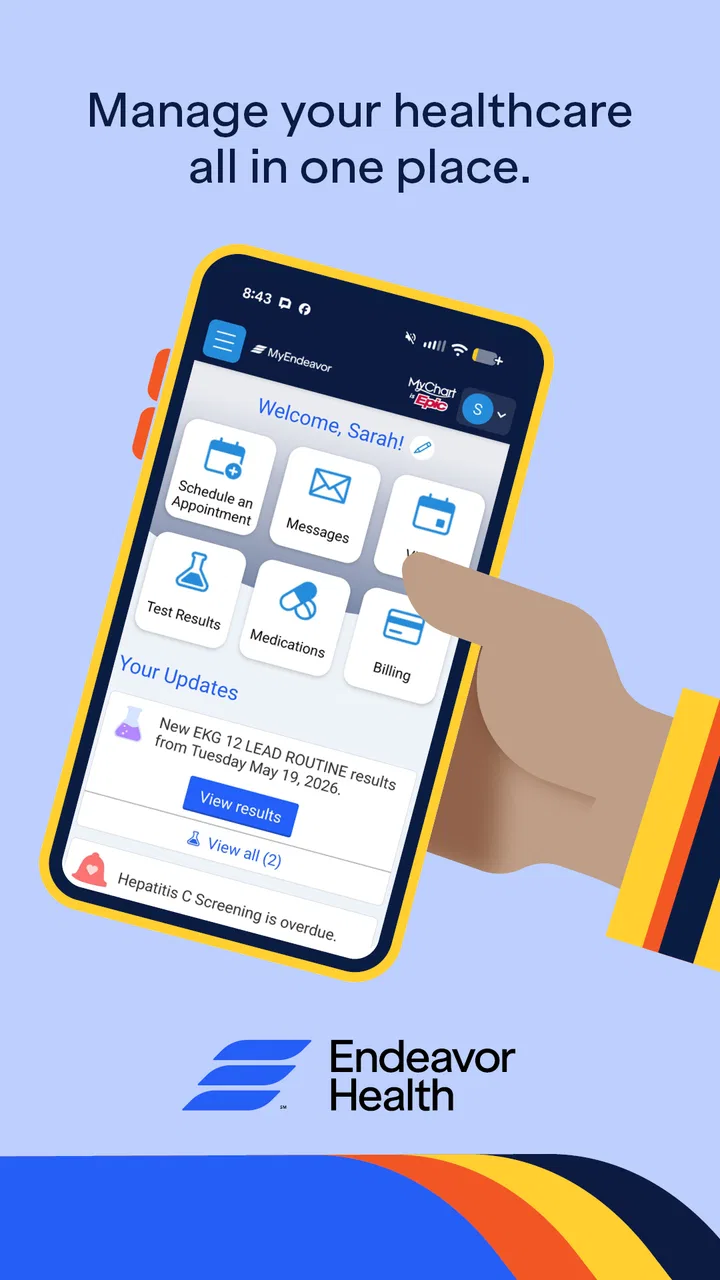
MyEndeavor
- 4.3
- Rating
- 100.00K
- Installs
- Free
- Price

 Analysis by App-foxy
When I need to deal with a health-care task, the hardest part is often not the appointment or treatment itself. It is remembering where to begin, finding the right information, and keeping track of what happens next. MyEndeavor is designed for that part of the experience: it is a free medical app from Endeavor Health that puts the organization’s mobile access point on an Android phone. After spending time with it, I see it as most useful for people who already use Endeavor Health and want a more direct way to stay connected to their care.
The app has been available since December 31, 2015, and its current version is 11.8.3. That long presence matters because this is not a novelty app built around one narrow health feature. It feels like a practical companion for an existing health-care relationship. Its audience is broad as well: the content rating is Everyone, and the app has passed 100K+ installs. At the time of writing, it holds a 4.3 average from around 4.1K ratings, with roughly 548 written reviews.
My main takeaway is simple: MyEndeavor is most valuable when it reduces the number of separate steps between a health concern and the next sensible action. It is not a replacement for urgent medical help, a personal medical adviser, or a general wellness tracker. Instead, it belongs in the more practical category of tools that help patients navigate an established health system.
You May Also Like

 Blood Strike: 2.5 Anniversary
Blood Strike’s Loadouts Turn Every Drop Into a Tactical Gamble
A close look at Blood Strike’s custom loadouts: how fast access to signature weapons reshapes its battle royale rhythm, rewards preparation, and narrows the gap between fights.

 Pandora - Music & Podcasts
Pandora’s Music Is Easy to Start, but Harder to Recover
Pandora’s strength is its low-effort path from a seed to a station. Its weak spot is how much confidence it asks you to place in connection, setup, and quiet recovery.

 8 Ball Pool
 Is Built on Rivalries, Rematches, and Routine
A close look at the rivalries, rematches, shared routines, and unanswered safety questions that turn a quick pool match into a persistent mobile community.

 Samsung Music
’s Quiet Strength Is Playing What You Already Own
Its reach comes less from spectacle than from dependable access to a personal library. That simplicity is both the app’s strongest retention engine and its ceiling.

 AccuWeather: Weather Radar
AccuWeather Review: A Quick, Clear Forecast for Everyday Decisions
For everyday plans, the best forecast is the one you can understand quickly. AccuWeather makes rain timing, radar, and local conditions easy to act on, with a few trade-offs.

 Hill Climb Racing
Why Hill Climb Racing Still Turns Crashes Into One More Run
A tiny car, a bumpy hill and one more upgrade: Hill Climb Racing keeps resurfacing because its simple chaos makes every near-miss feel personal.
More From Our News Desk



Following a real health-care task from concern to outcome
When I use a health-care app, I want it to help me move from a concern to a clear next step without making me guess where to begin. This section follows that practical journey, from deciding whether a task belongs in MyEndeavor to knowing when a phone call or urgent care is the better route. I’ll also look at how preparation can make a digital handoff more useful, before turning to the app’s everyday performance.
Starting with the situation that brings you to the app
A realistic use case might begin with something ordinary: I notice a symptom, remember that I need to arrange care, or realize that a previous visit left me with follow-up work. In the past, I might search through old messages, look for a phone number, open a browser, and try to remember which part of the organization handles the request. That scattered process creates unnecessary uncertainty before I have even spoken with a professional.
MyEndeavor gives that situation a clearer starting point. Rather than treating health care as a collection of unrelated websites and phone calls, it presents itself as the mobile entry point for Endeavor Health. That distinction is important. The app makes the most sense when my care already sits within that network. If I use several unrelated providers, the experience will not magically combine every record, appointment, or conversation into one universal health dashboard.
That is also why I would not install it simply because it is a medical app. Its value depends on the relationship between the patient and Endeavor Health. For an existing patient, the app can help turn “I need to deal with this” into a more organized sequence. For someone looking for symptom diagnosis, medication education, or a broad health journal, a different type of app may be a better starting point.
Moving from intention to the first action
The first practical advantage is reducing the mental load around access. Instead of beginning with a general web search, I can open the organization’s dedicated app and work from there. That sounds minor, but health-care tasks are often delayed because the first step feels vague. A familiar app icon can become a reliable starting point for recurring needs.
I would approach the first session with realistic expectations. A medical app is only useful if I take time to sign in carefully, check that I am using the correct account, and review the information presented before acting on it. I would also keep my phone’s operating system compatible, since the listed minimum is Android 11. On a supported device, that requirement is not especially demanding, but it is still worth checking before troubleshooting an installation problem.
MyEndeavor is free, which removes one common barrier to trying it. There is no purchase decision to make before I can judge whether it fits my routine. Still, “free” does not mean that every possible health-care task becomes instant or automatic. The app is a doorway into care, and the speed of the next step can depend on the organization, the type of request, and the people who need to respond.
Working through the task instead of treating the app as a shortcut
Once I have started a task, the useful mindset is to treat the app as a workflow guide rather than a magic button. I would read each screen closely, confirm that the request applies to the right patient or care need, and avoid rushing through details simply because the interface is on a phone. In health care, a small mistake in context can create more delay than taking an extra moment at the beginning.
One non-obvious benefit of a dedicated app is continuity of attention. When I use a browser search, I can easily drift into unrelated results, outdated pages, or the wrong department. A purpose-built app narrows the environment. That does not guarantee that every interaction will be smooth, but it can make the process feel less like searching the internet and more like continuing an existing relationship.
I also find that mobile access changes when I handle administrative work. A laptop encourages me to postpone a task until I have time to sit down. A phone makes it easier to begin while I am already thinking about the issue. The trade-off is that a smaller screen can make careful reading harder, especially when a health form, instruction, or message contains dense information. For anything complex, I would rather slow down than tap through quickly.
Where the handoffs matter
The most important part of a medical app workflow is often the handoff between the patient and the care team. MyEndeavor can help me initiate or organize that exchange, but it cannot remove the need for a human response when the issue requires one. This is where expectations need to stay grounded. Sending a request through an app is not the same as receiving immediate care.
In a normal scenario, I might use the app to begin a non-urgent request, provide the relevant context, and then wait for the next response or instruction. The app’s role is to make the request easier to place and easier to revisit than a loose note or a half-remembered phone conversation. The care team still has to interpret the situation, decide what action is appropriate, and communicate the outcome.
This handoff also highlights why accuracy matters. If I am describing a change in symptoms, I would write down when it started, what has changed, and what I have already tried before opening the app. Preparing that information first is a useful workflow improvement because it prevents the mobile form from becoming a rushed memory test. MyEndeavor can be the channel, but good preparation improves the quality of the exchange.
For families, the handoff can be more complicated. A parent, partner, or caregiver may be helping with health tasks, but access and responsibility still need to be handled appropriately. I would not assume that having the app on my phone automatically gives me permission to manage another person’s care. The safest approach is to use the account and access arrangements that apply to the patient and the organization’s process.
What a successful result looks like
The result I want from MyEndeavor is not entertainment or a stream of motivational reminders. It is a clearer next step: knowing that I have reached the appropriate part of Endeavor Health, completed the information requested, and can follow the resulting communication without reconstructing the whole story from memory.
That makes the app especially relevant for recurring care. Someone managing regular appointments, ongoing questions, or follow-up responsibilities may appreciate having one familiar place to begin. The benefit accumulates through repetition. A single interaction may not feel transformative, but removing small points of friction across several health-care tasks can make the overall experience less tiring.
I also like the possibility of using the app as a personal checkpoint. After completing a task, I can mentally separate what I have done from what still depends on the care team. That distinction prevents a common mistake: assuming that submitting information means the clinical issue has already been resolved. The app can support organization, but I still need to pay attention to instructions and follow through outside the screen when necessary.
For someone deciding whether to keep it installed, I would ask whether Endeavor Health is already part of their routine. If the answer is yes, the free price and focused purpose make it easy to justify keeping. If the answer is no, the app may offer little practical value compared with the health system or patient portal already connected to that person’s providers.
Where the flow breaks down
No mobile layer can solve every weakness in health care. The first possible break is access itself. If I cannot sign in, do not have the necessary account details, or encounter a device compatibility issue, the app becomes another obstacle rather than a shortcut. That is not unique to MyEndeavor, but it matters more in medical situations because frustration can quickly turn into postponed care.
The second break is urgency. I would never use a patient app as the only response to a serious or rapidly worsening condition. A phone-based workflow can involve waiting, reading, and handoffs. An emergency requires the appropriate immediate service, not a message left inside an app. MyEndeavor is better suited to planned or non-urgent organization than to situations where delay could be dangerous.
The third break is complexity. A short administrative request may fit comfortably on a phone, while a complicated medical history, multiple concerns, or difficult-to-describe symptoms may be easier to explain in a conversation. In those cases, the app can still be useful as a starting point, but I would not force every detail into a small-screen workflow when speaking directly with a qualified professional would be clearer.
There is also a human limitation that no interface can avoid: I may forget to check for a response. Mobile access makes communication available, but it does not automatically make me attentive. I would treat notifications and follow-up as part of my responsibility, while remembering that an app should not be the sole place I monitor if a clinician has given me a different instruction.
How it compares with the usual alternatives
The closest alternative is usually a browser-based patient portal or a phone call to the health system. A browser can be more comfortable for long forms, detailed records, and careful reading. It is also easier to use on a larger screen when I need to compare information or type a long explanation. The advantage of MyEndeavor is convenience and familiarity: it keeps the entry point close at hand instead of making me remember a web address or search for the right page.
A phone call remains better when the issue is complicated, sensitive, or difficult to categorize. Speaking with staff can clarify the correct department immediately, although it may require more time and patience. MyEndeavor is preferable when I already understand the task and want a structured digital route. It is less attractive when I am unsure where the request belongs or need a back-and-forth conversation before choosing the next step.
General health apps are another different option. They may focus on exercise, nutrition, symptom notes, medication reminders, or personal measurements. MyEndeavor should not be judged by those standards because its purpose is tied to Endeavor Health rather than broad self-tracking. If my goal is to build a private wellness log, I would choose a specialized tracker. If my goal is to connect with this particular health system, the dedicated app is the more relevant tool.
Small habits that make the app more useful
I would prepare before opening it. Writing down the main question, the timing of the issue, and the outcome I want can make the interaction more precise. This is especially useful when I am tired or worried, because a prepared note reduces the chance that I will leave out an important detail simply because the phone screen encourages quick tapping.
I would also avoid treating every notification as an answer. A notification may indicate that something needs attention, but I would open the relevant information, read it fully, and distinguish between an administrative update and clinical guidance. That habit prevents me from acting on a partial preview or assuming that a routine message changes my care plan.
For repeated tasks, I would establish a simple personal routine: open the app when I know I need to act, complete one request at a time, and make a separate note of anything that still requires follow-up. This is more reliable than opening the app repeatedly without a clear purpose. The app works best when it supports a deliberate process rather than becoming another source of digital clutter.
Finally, I would keep a non-digital backup for important instructions. A phone can run out of power, become unavailable, or make long information awkward to review. MyEndeavor can simplify access, but sensible health organization still includes knowing what I need to remember if I cannot immediately open the app.
Who should use it and who should look elsewhere
I would recommend MyEndeavor to an Endeavor Health patient who wants a convenient mobile starting point for managing contact with the organization. It is also a reasonable choice for someone who tends to postpone health-care administration because the usual web or phone route feels inconvenient. The app’s free availability makes experimenting with it low-risk, provided the person has a compatible Android device and an existing reason to use Endeavor Health services.
I would be more cautious about recommending it to someone whose providers are outside Endeavor Health, someone seeking an all-purpose symptom checker, or someone who expects immediate answers to urgent concerns. It is not the right substitute for emergency help, direct clinical conversation, or a dedicated personal health-tracking tool. Those needs require different strengths.
MyEndeavor is also not a cure for every frustrating part of the health-care system. Delays, unclear instructions, account problems, and complex handoffs can still happen. What it offers is a more focused route through the part of the process that can reasonably be handled on a phone. That is a narrower promise than “manage everything,” but it is also a more believable one.
My final assessment after following the workflow
After looking at the complete journey—from recognizing a need, starting a request, handing information to the care team, and waiting for an outcome—I see MyEndeavor as a practical access tool rather than a feature-packed health companion. Its strongest quality is focus. It gives Endeavor Health patients a dedicated place to begin, which can replace scattered searches and reduce the friction of routine contact.
The app’s 4.3 average and 100K+ installs suggest that it has found a meaningful audience, while the written feedback from around 548 reviews shows that users have taken the time to discuss their experiences. I would not treat those figures as a guarantee that every interaction will be effortless, because medical workflows depend on accounts, staff responses, and the complexity of each request. They do, however, fit my impression that this is an established tool rather than an experiment.
MyEndeavor is worth installing when your care is connected to Endeavor Health and you want a simpler mobile starting point. I would keep the usual alternatives available for emergencies, complicated conversations, and long-form tasks. Used with those boundaries in mind, this free medical app can make ordinary health-care administration feel more manageable without pretending that a phone can replace the people and decisions behind the care.
FAQs for MyEndeavor
01What is MyEndeavor and what can I use it for?
MyEndeavor is a mobile application designed to help users organize, follow, and manage personal endeavors, goals, or ongoing activities from one place. Depending on the features available in your version, you may be able to create objectives, monitor progress, review updates, and stay motivated. Before downloading, check the app listing to confirm whether its tools match the type of planning or tracking you need.
02Is MyEndeavor free to download and use?
MyEndeavor may be available as a free download, but some features could require in-app purchases, a subscription, or an account upgrade. The exact pricing and limitations can vary between Android and iOS and may also change over time. We recommend reviewing the store page carefully before installing, especially the subscription terms, trial period, renewal conditions, and cancellation instructions.
03Does MyEndeavor require an account or an internet connection?
The need for an account and internet access depends on how MyEndeavor handles saved data, synchronization, notifications, and connected services. Some basic functions may work offline, while cloud-based features could require a stable connection and user login. If privacy or offline access is important to you, review the permissions and account requirements shown on the official app-store listing before downloading.
04Is MyEndeavor suitable for beginners?
MyEndeavor appears intended to be approachable for users who want a straightforward way to manage their goals or activities, although the experience may depend on how many features you choose to use. New users should be able to start with the basic tools and explore more advanced options gradually. A short setup process or tutorial may still be necessary to understand the app’s workflow.
05What should I know about privacy and device permissions in MyEndeavor?
Before installing MyEndeavor, it is worth checking the privacy information and requested permissions in the Google Play Store or Apple App Store. Depending on its functions, the app may request access to notifications, storage, account information, or other device features. Only grant permissions that make sense for the tools you plan to use, and review the developer’s data-safety disclosures before creating an account.
Pros
- Simple interface makes core features easy to find.
- Progress tracking helps users stay focused on personal goals.
- Useful reminders can encourage consistent daily engagement.
- Works well for short check-ins when time is limited.
- Personalized content makes the experience feel more relevant.
Cons
- Some features may require an account or personal information.
- Notifications can become repetitive if used frequently.
- Limited customization may not suit every user’s preferences.
- The app’s usefulness depends on maintaining regular engagement.
- Performance may vary on older phones or slower connections.

MyEndeavor
Gallery